> ## Documentation Index
> Fetch the complete documentation index at: https://docs.coinpaprika.com/llms.txt
> Use this file to discover all available pages before exploring further.
# CoinPaprika Claude Code plugin
> Install the CoinPaprika Claude Code plugin with two commands. Access real-time crypto prices, market data, and exchange information directly in Claude Code.
## What is the CoinPaprika Claude Code plugin?
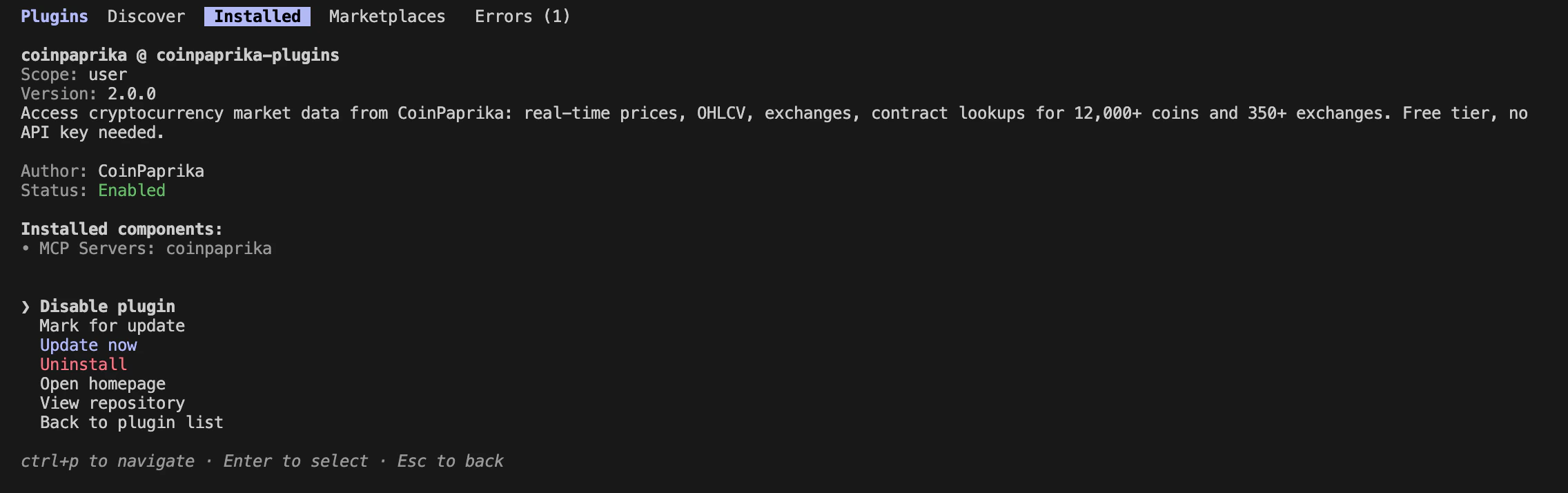
The CoinPaprika plugin is a native Claude Code plugin that gives you instant access to real-time cryptocurrency market data -- prices, volumes, market caps, exchange data, historical OHLCV, and more -- covering 12,000+ coins and 350+ exchanges.
Two commands. Zero configuration. The plugin bundles a built-in MCP server, so no separate MCP setup is needed.
 ***
## Install
```bash theme={"dark"}
/plugin marketplace add coinpaprika/claude-marketplace
```
This registers the CoinPaprika marketplace where the plugin is hosted.
```bash theme={"dark"}
/plugin install coinpaprika
```
Select **"Install now"** when prompted.
***
## Install
```bash theme={"dark"}
/plugin marketplace add coinpaprika/claude-marketplace
```
This registers the CoinPaprika marketplace where the plugin is hosted.
```bash theme={"dark"}
/plugin install coinpaprika
```
Select **"Install now"** when prompted.
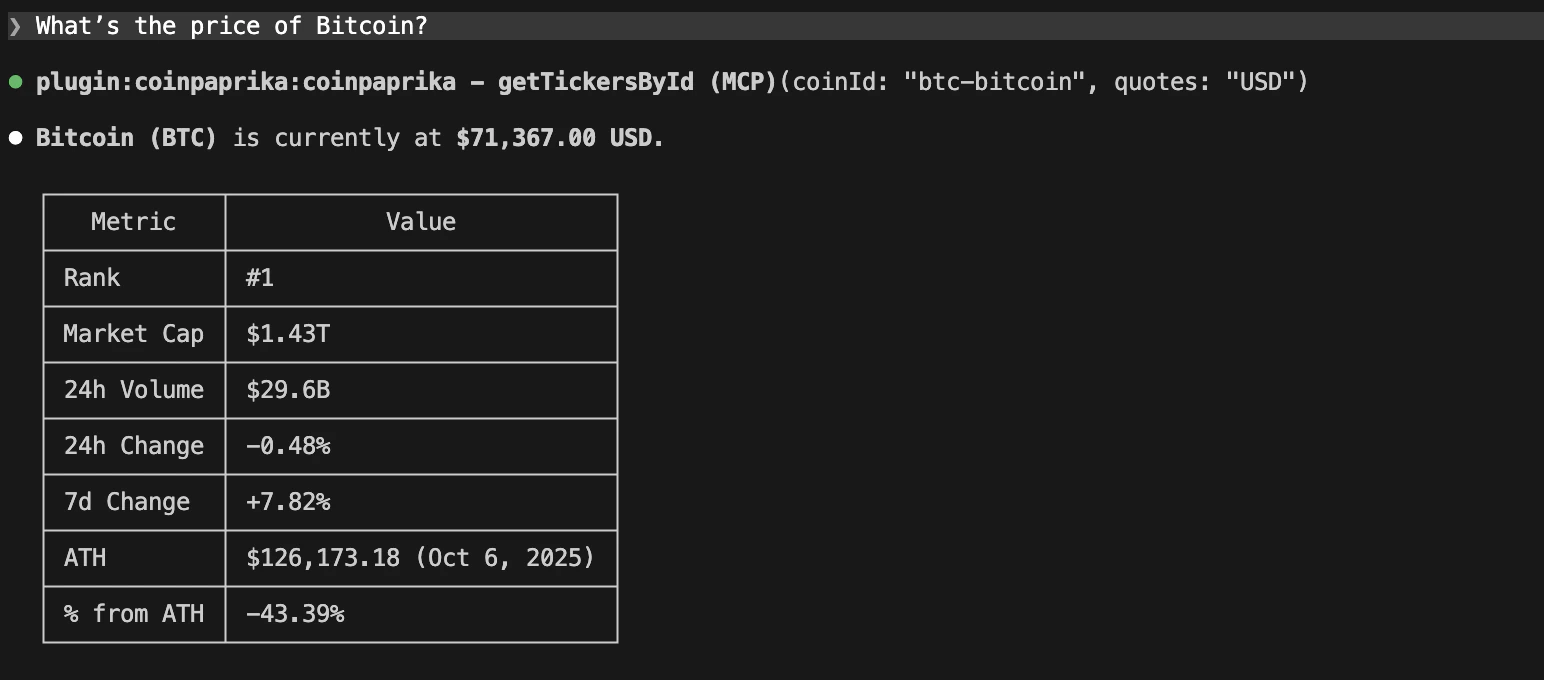
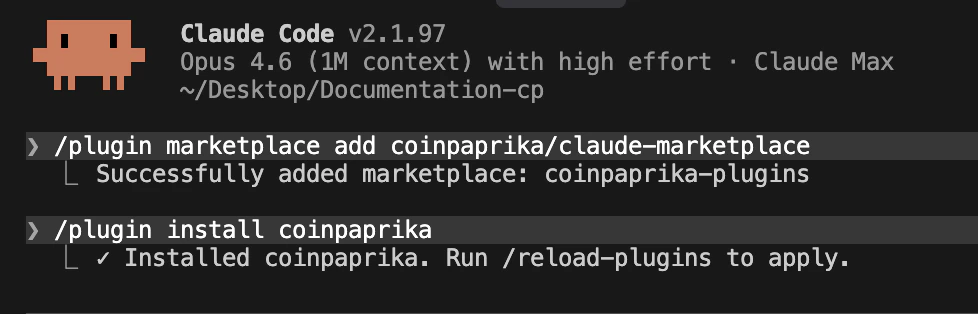 That's it. No config files, no environment setup, no API keys needed for the free tier. Ask Claude about crypto data and it uses the plugin automatically.
 ***
## What you get
The CoinPaprika plugin includes:
| Component | What it does |
| ------------------------- | --------------------------------------------------------------------------------------- |
| **29 MCP tools** | Live data access: tickers, coins, exchanges, OHLCV, contracts, tags, search, conversion |
| **@crypto-analyst agent** | Specialized agent for market analysis and portfolio queries |
| **Agent skills** | API reference files that give Claude deeper knowledge of CoinPaprika endpoints |
***
## Example queries
Once installed, ask Claude about crypto data naturally:
### Prices and tickers
```
What's the current price of Bitcoin and Ethereum?
```
```
Show me the top 10 coins by market cap with their 24h price change
```
### Exchange data
```
Which exchanges list Solana? Sort by volume.
```
```
What are the trading pairs available for ETH on Binance?
```
### Historical data
```
Get Bitcoin's OHLCV data for the last 30 days
```
```
How has Ethereum's price changed over the past year?
```
### Search and discovery
```
Search for DeFi tokens
```
```
What coins are tagged as stablecoins?
```
### Using the @crypto-analyst agent
```
@crypto-analyst Analyze the current state of the top 5 cryptocurrencies
```
```
@crypto-analyst Compare Bitcoin and Ethereum market performance this month
```
***
## Manage the plugin
### View installed plugins
```
/plugin
```
Select "Manage Plugins" to see all installed plugins and their status.
### Enable/disable
```bash theme={"dark"}
# Disable (keeps installed, reduces context usage)
/plugin disable coinpaprika@coinpaprika
# Re-enable
/plugin enable coinpaprika@coinpaprika
```
### Update
```bash theme={"dark"}
/plugin marketplace update coinpaprika/claude-marketplace
```
### Uninstall
```bash theme={"dark"}
/plugin uninstall coinpaprika@coinpaprika
```
***
## Plugin vs MCP server vs skills
| | Claude Code Plugin | Hosted MCP Server | Agent Skills |
| ---------------- | ---------------------------------------------------- | ------------------------------- | ----------------------------------------- |
| **Install** | `/plugin install` | Add URL to config | `npx skills add` |
| **What you get** | MCP tools + agent + skills (all bundled) | 29 MCP tools | API knowledge (endpoints, CLI, workflows) |
| **Works with** | Claude Code only | Claude Desktop, Cursor, VS Code | Claude Code, Cursor, Cline, and more |
| **Best for** | Claude Code users who want everything in one install | Other AI IDEs | Any agent that makes HTTP calls directly |
If you use Claude Code, the plugin is the easiest path -- it bundles everything. For Claude Desktop or Cursor, use the [hosted MCP server](/mcp-connect-claude-cursor) instead.
***
## Integration with DexPaprika
The same marketplace also hosts the **DexPaprika plugin** for on-chain DEX data. Install both for complete crypto coverage:
```bash theme={"dark"}
/plugin install coinpaprika
/plugin install dexpaprika
```
* **CoinPaprika** -- CEX data: 12,000+ coins, 350+ exchanges, market caps, OHLCV
* **DexPaprika** -- DEX data: 34 blockchains, 30M+ pools, on-chain token prices, streaming
***
## Troubleshooting
1. Run `/plugin marketplace update coinpaprika/claude-marketplace`
2. Restart Claude Code
3. Run `/plugin install coinpaprika` again
Be specific: "Using CoinPaprika, show me..." or phrase questions about coins, prices, and exchanges. Claude automatically recognizes plugin-relevant queries, but explicit mentions help.
Make sure you're running commands inside Claude Code (not a regular terminal). Check that you're using the correct syntax: `/plugin install coinpaprika`.
Check that the coin ID format is correct (`btc-bitcoin`, not `bitcoin` or `BTC`). Use "search for \[coin name]" to find the right ID. For free tier limitations (2,000 assets), some smaller coins may not be available.
***
## What's next?
Connect Claude Desktop or Cursor to CoinPaprika data
Install CoinPaprika skills for any AI agent
Complete endpoint documentation with interactive playground
Query crypto data from the terminal
***
## Need help?
Connect with our community for real-time support and discussions
Contact our team for technical assistance and custom integrations
### FAQs
Not for the free tier. The plugin uses the free CoinPaprika API (20,000 calls/month, 2,000 assets) by default. No key, no registration.
The plugin is Claude Code only. For Cursor or Claude Desktop, use the [hosted MCP server](/mcp-connect-claude-cursor) instead -- same data, different integration method.
The plugin bundles the MCP server plus extras (agents, skills). If you use Claude Code, the plugin is the easiest path. The standalone MCP server works with more tools (Claude Desktop, Cursor, VS Code).
Yes. Install both from the same marketplace. CoinPaprika covers centralized exchange data; DexPaprika covers on-chain DEX data.
***
## What you get
The CoinPaprika plugin includes:
| Component | What it does |
| ------------------------- | --------------------------------------------------------------------------------------- |
| **29 MCP tools** | Live data access: tickers, coins, exchanges, OHLCV, contracts, tags, search, conversion |
| **@crypto-analyst agent** | Specialized agent for market analysis and portfolio queries |
| **Agent skills** | API reference files that give Claude deeper knowledge of CoinPaprika endpoints |
***
## Example queries
Once installed, ask Claude about crypto data naturally:
### Prices and tickers
```
What's the current price of Bitcoin and Ethereum?
```
```
Show me the top 10 coins by market cap with their 24h price change
```
### Exchange data
```
Which exchanges list Solana? Sort by volume.
```
```
What are the trading pairs available for ETH on Binance?
```
### Historical data
```
Get Bitcoin's OHLCV data for the last 30 days
```
```
How has Ethereum's price changed over the past year?
```
### Search and discovery
```
Search for DeFi tokens
```
```
What coins are tagged as stablecoins?
```
### Using the @crypto-analyst agent
```
@crypto-analyst Analyze the current state of the top 5 cryptocurrencies
```
```
@crypto-analyst Compare Bitcoin and Ethereum market performance this month
```
***
## Manage the plugin
### View installed plugins
```
/plugin
```
Select "Manage Plugins" to see all installed plugins and their status.
### Enable/disable
```bash theme={"dark"}
# Disable (keeps installed, reduces context usage)
/plugin disable coinpaprika@coinpaprika
# Re-enable
/plugin enable coinpaprika@coinpaprika
```
### Update
```bash theme={"dark"}
/plugin marketplace update coinpaprika/claude-marketplace
```
### Uninstall
```bash theme={"dark"}
/plugin uninstall coinpaprika@coinpaprika
```
***
## Plugin vs MCP server vs skills
| | Claude Code Plugin | Hosted MCP Server | Agent Skills |
| ---------------- | ---------------------------------------------------- | ------------------------------- | ----------------------------------------- |
| **Install** | `/plugin install` | Add URL to config | `npx skills add` |
| **What you get** | MCP tools + agent + skills (all bundled) | 29 MCP tools | API knowledge (endpoints, CLI, workflows) |
| **Works with** | Claude Code only | Claude Desktop, Cursor, VS Code | Claude Code, Cursor, Cline, and more |
| **Best for** | Claude Code users who want everything in one install | Other AI IDEs | Any agent that makes HTTP calls directly |
If you use Claude Code, the plugin is the easiest path -- it bundles everything. For Claude Desktop or Cursor, use the [hosted MCP server](/mcp-connect-claude-cursor) instead.
***
## Integration with DexPaprika
The same marketplace also hosts the **DexPaprika plugin** for on-chain DEX data. Install both for complete crypto coverage:
```bash theme={"dark"}
/plugin install coinpaprika
/plugin install dexpaprika
```
* **CoinPaprika** -- CEX data: 12,000+ coins, 350+ exchanges, market caps, OHLCV
* **DexPaprika** -- DEX data: 34 blockchains, 30M+ pools, on-chain token prices, streaming
***
## Troubleshooting
1. Run `/plugin marketplace update coinpaprika/claude-marketplace`
2. Restart Claude Code
3. Run `/plugin install coinpaprika` again
Be specific: "Using CoinPaprika, show me..." or phrase questions about coins, prices, and exchanges. Claude automatically recognizes plugin-relevant queries, but explicit mentions help.
Make sure you're running commands inside Claude Code (not a regular terminal). Check that you're using the correct syntax: `/plugin install coinpaprika`.
Check that the coin ID format is correct (`btc-bitcoin`, not `bitcoin` or `BTC`). Use "search for \[coin name]" to find the right ID. For free tier limitations (2,000 assets), some smaller coins may not be available.
***
## What's next?
Connect Claude Desktop or Cursor to CoinPaprika data
Install CoinPaprika skills for any AI agent
Complete endpoint documentation with interactive playground
Query crypto data from the terminal
***
## Need help?
Connect with our community for real-time support and discussions
Contact our team for technical assistance and custom integrations
### FAQs
Not for the free tier. The plugin uses the free CoinPaprika API (20,000 calls/month, 2,000 assets) by default. No key, no registration.
The plugin is Claude Code only. For Cursor or Claude Desktop, use the [hosted MCP server](/mcp-connect-claude-cursor) instead -- same data, different integration method.
The plugin bundles the MCP server plus extras (agents, skills). If you use Claude Code, the plugin is the easiest path. The standalone MCP server works with more tools (Claude Desktop, Cursor, VS Code).
Yes. Install both from the same marketplace. CoinPaprika covers centralized exchange data; DexPaprika covers on-chain DEX data.