> ## Documentation Index
> Fetch the complete documentation index at: https://docs.coinpaprika.com/llms.txt
> Use this file to discover all available pages before exploring further.
# CoinPaprika CLI -- crypto data from your terminal
> Install the CoinPaprika CLI with one command. Query coin prices, market data, OHLCV history, exchanges, and more from your terminal. Supports macOS, Linux, and Windows.
## What is the CoinPaprika CLI?
A command-line tool for querying cryptocurrency market data. Covers the entire CoinPaprika API -- tickers, coins, exchanges, OHLCV, search, contracts, tags, and currency conversion. Free tier included, no API key needed to start.
**Source:** [github.com/coinpaprika/coinpaprika-cli](https://github.com/coinpaprika/coinpaprika-cli)
***
## Install
### One-line install (macOS, Linux)
```bash theme={"dark"}
curl -sSL https://raw.githubusercontent.com/coinpaprika/coinpaprika-cli/main/install.sh | sh
```
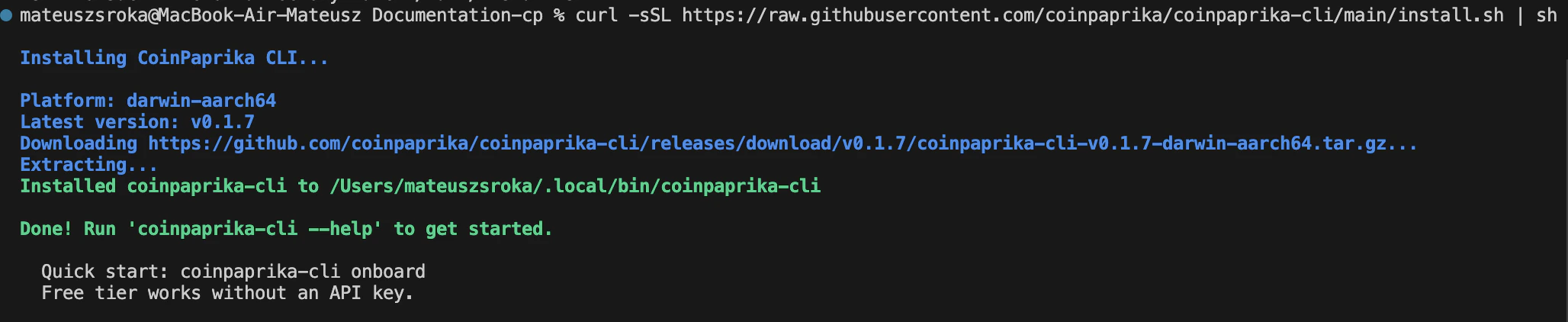 ### Verify installation
```bash theme={"dark"}
coinpaprika-cli status
```
You should see a health check response confirming the API is reachable.
### Quick start wizard
```bash theme={"dark"}
coinpaprika-cli onboard
```
Walks you through first commands, API key setup (optional), and configuration.
***
## Commands
Every CoinPaprika REST API endpoint has a matching CLI command:
| Command | What it does | Example |
| ------------------ | -------------------------------------------- | --------------------------------------------------------------------------- |
| `global` | Market overview (cap, volume, BTC dominance) | `coinpaprika-cli global` |
| `coins` | List all coins | `coinpaprika-cli coins --limit 10` |
| `coin` | Coin details | `coinpaprika-cli coin btc-bitcoin` |
| `coin-events` | Coin events | `coinpaprika-cli coin-events btc-bitcoin` |
| `coin-exchanges` | Exchanges listing a coin | `coinpaprika-cli coin-exchanges btc-bitcoin` |
| `coin-markets` | Trading pairs for a coin | `coinpaprika-cli coin-markets btc-bitcoin` |
| `tickers` | All tickers (real-time prices) | `coinpaprika-cli tickers --limit 20` |
| `ticker` | Single coin ticker | `coinpaprika-cli ticker btc-bitcoin` |
| `ticker-history` | Historical tickers \[Starter+] | `coinpaprika-cli ticker-history btc-bitcoin --start 2024-01-01` |
| `ohlcv` | Historical OHLCV \[Starter+] | `coinpaprika-cli ohlcv btc-bitcoin --start 2024-01-01` |
| `ohlcv-latest` | Last full day OHLCV | `coinpaprika-cli ohlcv-latest btc-bitcoin` |
| `ohlcv-today` | Today's OHLCV (partial) | `coinpaprika-cli ohlcv-today btc-bitcoin` |
| `exchanges` | List exchanges | `coinpaprika-cli exchanges --limit 10` |
| `exchange` | Exchange details | `coinpaprika-cli exchange binance` |
| `exchange-markets` | Markets on an exchange | `coinpaprika-cli exchange-markets binance` |
| `tags` | List tags/categories | `coinpaprika-cli tags` |
| `tag` | Tag details | `coinpaprika-cli tag defi` |
| `person` | Person details | `coinpaprika-cli person vitalik-buterin` |
| `search` | Search coins, exchanges, people, tags | `coinpaprika-cli search bitcoin` |
| `convert` | Currency conversion | `coinpaprika-cli convert btc-bitcoin usd-us-dollars` |
| `platforms` | List contract platforms | `coinpaprika-cli platforms` |
| `contracts` | Contracts on a platform | `coinpaprika-cli contracts eth-ethereum` |
| `contract-ticker` | Ticker by contract address | `coinpaprika-cli contract-ticker eth-ethereum 0xdac...` |
| `contract-history` | Contract history \[Starter+] | `coinpaprika-cli contract-history eth-ethereum 0xdac... --start 2024-01-01` |
| `key-info` | API key info \[Paid] | `coinpaprika-cli key-info` |
| `mappings` | ID mappings \[Business+] | `coinpaprika-cli mappings` |
| `changelog` | Coin ID changelog \[Starter+] | `coinpaprika-cli changelog` |
| `config show` | Show config | `coinpaprika-cli config show` |
| `config set-key` | Set API key | `coinpaprika-cli config set-key ` |
| `config reset` | Delete config | `coinpaprika-cli config reset` |
| `shell` | Interactive REPL | `coinpaprika-cli shell` |
| `onboard` | Setup wizard | `coinpaprika-cli onboard` |
| `status` | API health check | `coinpaprika-cli status` |
| `plans` | Free tier details and paid overview | `coinpaprika-cli plans` |
| `attribution` | Attribution snippets | `coinpaprika-cli attribution` |
***
## Output formats
The CLI outputs tables by default. Switch to JSON for scripting and piping:
```bash theme={"dark"}
# Table output (default, human-readable)
coinpaprika-cli ticker btc-bitcoin
# JSON with metadata wrapper
coinpaprika-cli --output json ticker btc-bitcoin
# Raw JSON (no _meta wrapper, for piping to jq)
coinpaprika-cli --output json --raw ticker btc-bitcoin
```
Pipe raw JSON into `jq` for filtering:
```bash theme={"dark"}
coinpaprika-cli --output json --raw ticker btc-bitcoin | jq '.quotes.USD.price'
```
***
## Examples
### Get the Bitcoin price
```bash theme={"dark"}
coinpaprika-cli ticker btc-bitcoin
```
### Top 10 coins by market cap
```bash theme={"dark"}
coinpaprika-cli tickers --limit 10
```
### Search for a coin
```bash theme={"dark"}
coinpaprika-cli search solana
```
### Global market overview
```bash theme={"dark"}
coinpaprika-cli global
```
### Historical OHLCV (requires Starter plan or above)
```bash theme={"dark"}
coinpaprika-cli ohlcv btc-bitcoin --start 2025-01-01
```
### Convert between currencies
```bash theme={"dark"}
coinpaprika-cli convert btc-bitcoin usd-us-dollars
```
### Look up a token by contract address
```bash theme={"dark"}
coinpaprika-cli contract-ticker eth-ethereum 0xa0b86991c6218b36c1d19d4a2e9eb0ce3606eb48
```
### Interactive REPL
```bash theme={"dark"}
coinpaprika-cli shell
```
Opens an interactive session where you can run commands without typing `coinpaprika-cli` each time.
***
## API key setup
The free tier works without a key (20,000 calls/month, 2,000 assets). For paid tiers:
```bash theme={"dark"}
# Interactive setup (recommended)
coinpaprika-cli onboard
# Or set directly
coinpaprika-cli config set-key YOUR_API_KEY
# Or use an environment variable
export COINPAPRIKA_API_KEY=your-key
# Or pass per-command
coinpaprika-cli --api-key your-key ticker btc-bitcoin
```
Priority: CLI flag > environment variable > config file.
Check your key and usage:
```bash theme={"dark"}
coinpaprika-cli key-info
```
***
## Coin ID format
CoinPaprika coin IDs follow the pattern `{symbol}-{name}` (lowercase, hyphens for spaces):
`btc-bitcoin`, `eth-ethereum`, `usdt-tether`, `sol-solana`, `ada-cardano`, `doge-dogecoin`, `avax-avalanche`, `matic-polygon`
Use `coinpaprika-cli search {query}` to find the correct ID for any coin.
***
## Use with AI agents
AI agents running in terminals (Claude Code, Aider, etc.) can install and use the CLI as a tool. The one-liner install works in any shell:
```bash theme={"dark"}
curl -sSL https://raw.githubusercontent.com/coinpaprika/coinpaprika-cli/main/install.sh | sh
```
Once installed, agents can call `coinpaprika-cli` directly with `--output json --raw` for machine-readable output. This is useful when:
* The agent doesn't have MCP support
* You want the agent to script data pipelines
* You need to pipe output into other tools (`jq`, scripts)
* You're running headless or in CI/CD
***
## Troubleshooting
The installer puts the binary in `~/.local/bin`. If that's not in your PATH, add it:
```bash theme={"dark"}
export PATH="$HOME/.local/bin:$PATH"
```
Add that line to your `~/.bashrc`, `~/.zshrc`, or `~/.profile` to make it permanent.
The installer tries `~/.local/bin` first (no sudo needed). You can also set a custom directory:
```bash theme={"dark"}
COINPAPRIKA_INSTALL_DIR=~/bin curl -sSL https://raw.githubusercontent.com/coinpaprika/coinpaprika-cli/main/install.sh | sh
```
Check the coin ID format. Use `coinpaprika-cli search ` to find the correct ID. Coin IDs are lowercase: `btc-bitcoin`, not `Bitcoin` or `BTC`.
Historical endpoints (OHLCV, ticker history, contract history) require a Starter plan (\$99/mo) or above. Run `coinpaprika-cli plans` to see what's available on the free tier.
***
## What's next?
Complete endpoint documentation with interactive playground
Connect Claude Desktop or Cursor to CoinPaprika data
Install CoinPaprika skills for any AI agent
Official Python client for the CoinPaprika API
***
## Need help?
Connect with our community for real-time support and discussions
Contact our team for technical assistance and custom integrations
### FAQs
Not for the free tier. 20,000 calls/month, 2,000 assets, no key required. Paid plans (Starter \$99/mo and up) unlock all assets and historical endpoints.
10 requests per second per IP, across all plans. Each CLI command makes one API call.
Yes. AI agents can install it with one command and use `--output json --raw` for machine-readable output. The CLI covers every REST API endpoint.
Pre-built binaries are available on the [GitHub releases page](https://github.com/coinpaprika/coinpaprika-cli/releases). The install script works on macOS and Linux only.
### Verify installation
```bash theme={"dark"}
coinpaprika-cli status
```
You should see a health check response confirming the API is reachable.
### Quick start wizard
```bash theme={"dark"}
coinpaprika-cli onboard
```
Walks you through first commands, API key setup (optional), and configuration.
***
## Commands
Every CoinPaprika REST API endpoint has a matching CLI command:
| Command | What it does | Example |
| ------------------ | -------------------------------------------- | --------------------------------------------------------------------------- |
| `global` | Market overview (cap, volume, BTC dominance) | `coinpaprika-cli global` |
| `coins` | List all coins | `coinpaprika-cli coins --limit 10` |
| `coin` | Coin details | `coinpaprika-cli coin btc-bitcoin` |
| `coin-events` | Coin events | `coinpaprika-cli coin-events btc-bitcoin` |
| `coin-exchanges` | Exchanges listing a coin | `coinpaprika-cli coin-exchanges btc-bitcoin` |
| `coin-markets` | Trading pairs for a coin | `coinpaprika-cli coin-markets btc-bitcoin` |
| `tickers` | All tickers (real-time prices) | `coinpaprika-cli tickers --limit 20` |
| `ticker` | Single coin ticker | `coinpaprika-cli ticker btc-bitcoin` |
| `ticker-history` | Historical tickers \[Starter+] | `coinpaprika-cli ticker-history btc-bitcoin --start 2024-01-01` |
| `ohlcv` | Historical OHLCV \[Starter+] | `coinpaprika-cli ohlcv btc-bitcoin --start 2024-01-01` |
| `ohlcv-latest` | Last full day OHLCV | `coinpaprika-cli ohlcv-latest btc-bitcoin` |
| `ohlcv-today` | Today's OHLCV (partial) | `coinpaprika-cli ohlcv-today btc-bitcoin` |
| `exchanges` | List exchanges | `coinpaprika-cli exchanges --limit 10` |
| `exchange` | Exchange details | `coinpaprika-cli exchange binance` |
| `exchange-markets` | Markets on an exchange | `coinpaprika-cli exchange-markets binance` |
| `tags` | List tags/categories | `coinpaprika-cli tags` |
| `tag` | Tag details | `coinpaprika-cli tag defi` |
| `person` | Person details | `coinpaprika-cli person vitalik-buterin` |
| `search` | Search coins, exchanges, people, tags | `coinpaprika-cli search bitcoin` |
| `convert` | Currency conversion | `coinpaprika-cli convert btc-bitcoin usd-us-dollars` |
| `platforms` | List contract platforms | `coinpaprika-cli platforms` |
| `contracts` | Contracts on a platform | `coinpaprika-cli contracts eth-ethereum` |
| `contract-ticker` | Ticker by contract address | `coinpaprika-cli contract-ticker eth-ethereum 0xdac...` |
| `contract-history` | Contract history \[Starter+] | `coinpaprika-cli contract-history eth-ethereum 0xdac... --start 2024-01-01` |
| `key-info` | API key info \[Paid] | `coinpaprika-cli key-info` |
| `mappings` | ID mappings \[Business+] | `coinpaprika-cli mappings` |
| `changelog` | Coin ID changelog \[Starter+] | `coinpaprika-cli changelog` |
| `config show` | Show config | `coinpaprika-cli config show` |
| `config set-key` | Set API key | `coinpaprika-cli config set-key ` |
| `config reset` | Delete config | `coinpaprika-cli config reset` |
| `shell` | Interactive REPL | `coinpaprika-cli shell` |
| `onboard` | Setup wizard | `coinpaprika-cli onboard` |
| `status` | API health check | `coinpaprika-cli status` |
| `plans` | Free tier details and paid overview | `coinpaprika-cli plans` |
| `attribution` | Attribution snippets | `coinpaprika-cli attribution` |
***
## Output formats
The CLI outputs tables by default. Switch to JSON for scripting and piping:
```bash theme={"dark"}
# Table output (default, human-readable)
coinpaprika-cli ticker btc-bitcoin
# JSON with metadata wrapper
coinpaprika-cli --output json ticker btc-bitcoin
# Raw JSON (no _meta wrapper, for piping to jq)
coinpaprika-cli --output json --raw ticker btc-bitcoin
```
Pipe raw JSON into `jq` for filtering:
```bash theme={"dark"}
coinpaprika-cli --output json --raw ticker btc-bitcoin | jq '.quotes.USD.price'
```
***
## Examples
### Get the Bitcoin price
```bash theme={"dark"}
coinpaprika-cli ticker btc-bitcoin
```
### Top 10 coins by market cap
```bash theme={"dark"}
coinpaprika-cli tickers --limit 10
```
### Search for a coin
```bash theme={"dark"}
coinpaprika-cli search solana
```
### Global market overview
```bash theme={"dark"}
coinpaprika-cli global
```
### Historical OHLCV (requires Starter plan or above)
```bash theme={"dark"}
coinpaprika-cli ohlcv btc-bitcoin --start 2025-01-01
```
### Convert between currencies
```bash theme={"dark"}
coinpaprika-cli convert btc-bitcoin usd-us-dollars
```
### Look up a token by contract address
```bash theme={"dark"}
coinpaprika-cli contract-ticker eth-ethereum 0xa0b86991c6218b36c1d19d4a2e9eb0ce3606eb48
```
### Interactive REPL
```bash theme={"dark"}
coinpaprika-cli shell
```
Opens an interactive session where you can run commands without typing `coinpaprika-cli` each time.
***
## API key setup
The free tier works without a key (20,000 calls/month, 2,000 assets). For paid tiers:
```bash theme={"dark"}
# Interactive setup (recommended)
coinpaprika-cli onboard
# Or set directly
coinpaprika-cli config set-key YOUR_API_KEY
# Or use an environment variable
export COINPAPRIKA_API_KEY=your-key
# Or pass per-command
coinpaprika-cli --api-key your-key ticker btc-bitcoin
```
Priority: CLI flag > environment variable > config file.
Check your key and usage:
```bash theme={"dark"}
coinpaprika-cli key-info
```
***
## Coin ID format
CoinPaprika coin IDs follow the pattern `{symbol}-{name}` (lowercase, hyphens for spaces):
`btc-bitcoin`, `eth-ethereum`, `usdt-tether`, `sol-solana`, `ada-cardano`, `doge-dogecoin`, `avax-avalanche`, `matic-polygon`
Use `coinpaprika-cli search {query}` to find the correct ID for any coin.
***
## Use with AI agents
AI agents running in terminals (Claude Code, Aider, etc.) can install and use the CLI as a tool. The one-liner install works in any shell:
```bash theme={"dark"}
curl -sSL https://raw.githubusercontent.com/coinpaprika/coinpaprika-cli/main/install.sh | sh
```
Once installed, agents can call `coinpaprika-cli` directly with `--output json --raw` for machine-readable output. This is useful when:
* The agent doesn't have MCP support
* You want the agent to script data pipelines
* You need to pipe output into other tools (`jq`, scripts)
* You're running headless or in CI/CD
***
## Troubleshooting
The installer puts the binary in `~/.local/bin`. If that's not in your PATH, add it:
```bash theme={"dark"}
export PATH="$HOME/.local/bin:$PATH"
```
Add that line to your `~/.bashrc`, `~/.zshrc`, or `~/.profile` to make it permanent.
The installer tries `~/.local/bin` first (no sudo needed). You can also set a custom directory:
```bash theme={"dark"}
COINPAPRIKA_INSTALL_DIR=~/bin curl -sSL https://raw.githubusercontent.com/coinpaprika/coinpaprika-cli/main/install.sh | sh
```
Check the coin ID format. Use `coinpaprika-cli search ` to find the correct ID. Coin IDs are lowercase: `btc-bitcoin`, not `Bitcoin` or `BTC`.
Historical endpoints (OHLCV, ticker history, contract history) require a Starter plan (\$99/mo) or above. Run `coinpaprika-cli plans` to see what's available on the free tier.
***
## What's next?
Complete endpoint documentation with interactive playground
Connect Claude Desktop or Cursor to CoinPaprika data
Install CoinPaprika skills for any AI agent
Official Python client for the CoinPaprika API
***
## Need help?
Connect with our community for real-time support and discussions
Contact our team for technical assistance and custom integrations
### FAQs
Not for the free tier. 20,000 calls/month, 2,000 assets, no key required. Paid plans (Starter \$99/mo and up) unlock all assets and historical endpoints.
10 requests per second per IP, across all plans. Each CLI command makes one API call.
Yes. AI agents can install it with one command and use `--output json --raw` for machine-readable output. The CLI covers every REST API endpoint.
Pre-built binaries are available on the [GitHub releases page](https://github.com/coinpaprika/coinpaprika-cli/releases). The install script works on macOS and Linux only.