> ## Documentation Index
> Fetch the complete documentation index at: https://docs.coinpaprika.com/llms.txt
> Use this file to discover all available pages before exploring further.
# Install CoinPaprika agent skills
> Add the CoinPaprika skill to Claude Code, Cursor, or any compatible AI agent with one command. Gives your agent full knowledge of the CoinPaprika REST API, CLI, and SDKs.
## What are agent skills?
Agent skills are reusable instruction files that teach AI agents how to use a specific API. When you install the CoinPaprika skill, your AI agent gets a complete reference of every endpoint, CLI command, response format, and common workflow -- so it can make correct API calls without guessing.
Skills work with Claude Code, Cursor, Cline, OpenCode, and [many other AI agents](https://github.com/vercel-labs/skills). One install command. No API key needed for the free tier.
***
## What's included
The CoinPaprika skill installs the following files into your project:
| File | What it provides |
| ----------------------------- | ------------------------------------------------------------------------------------------------------------------------------------------------------------------------------------------- |
| `SKILL.md` | Full API reference: all REST endpoints (tickers, coins, exchanges, OHLCV, contracts, tags, search, conversion), CLI commands, MCP setup, SDK links, common workflows, coin IDs, rate limits |
| `references/openapi.yml` | Complete OpenAPI 3.1 specification with all schemas, parameters, and response types |
| `references/cli-reference.md` | Every `coinpaprika-cli` command with flags, examples, and output formats |
Your AI agent reads `SKILL.md` automatically. The reference files are loaded on demand when the agent needs deeper detail.
***
## Install
```bash theme={"dark"}
npx skills add github.com/coinpaprika/skills/ --skill coinpaprika-api
```
This copies the skill files into `.claude/skills/coinpaprika-api/` in your current project.
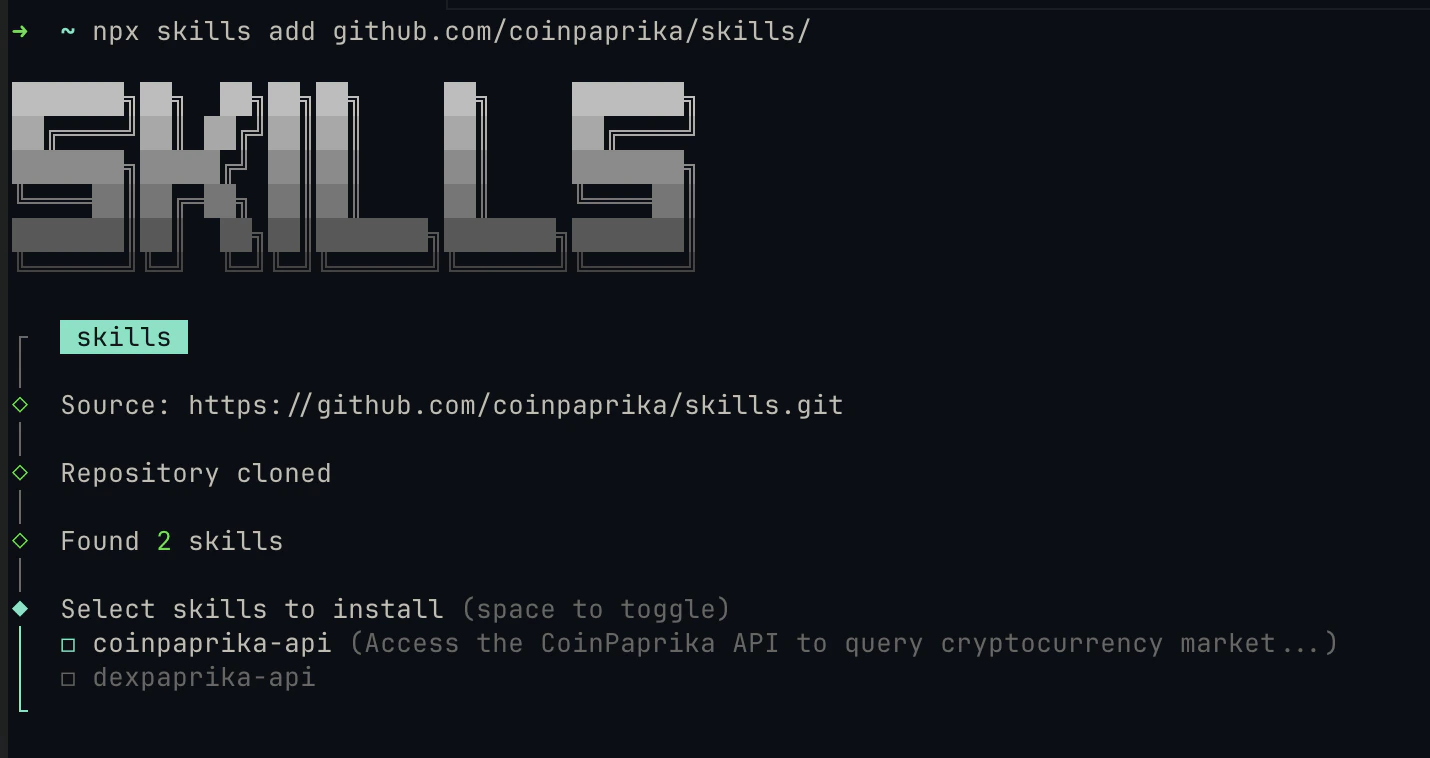 To install both CoinPaprika and DexPaprika skills at once, drop the `--skill` flag:
```bash theme={"dark"}
npx skills add github.com/coinpaprika/skills/
```
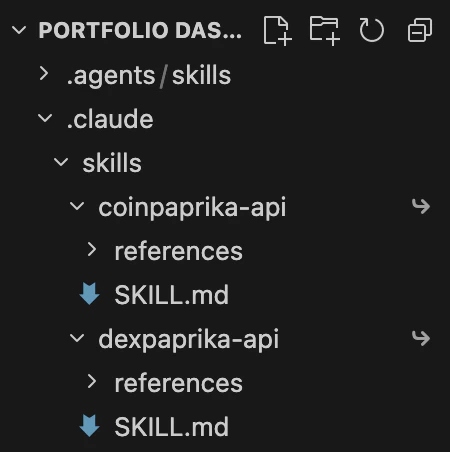
Your project directory should now contain:
```
.claude/skills/
coinpaprika-api/
SKILL.md
references/
openapi.yml
cli-reference.md
```
To install both CoinPaprika and DexPaprika skills at once, drop the `--skill` flag:
```bash theme={"dark"}
npx skills add github.com/coinpaprika/skills/
```
Your project directory should now contain:
```
.claude/skills/
coinpaprika-api/
SKILL.md
references/
openapi.yml
cli-reference.md
```
 Restart Claude Code (or your AI tool) so it picks up the new skill files. Skills are discovered at startup.
***
## Verify it works
After restarting, ask your AI agent a CoinPaprika question:
```
What's the current price of Bitcoin?
```
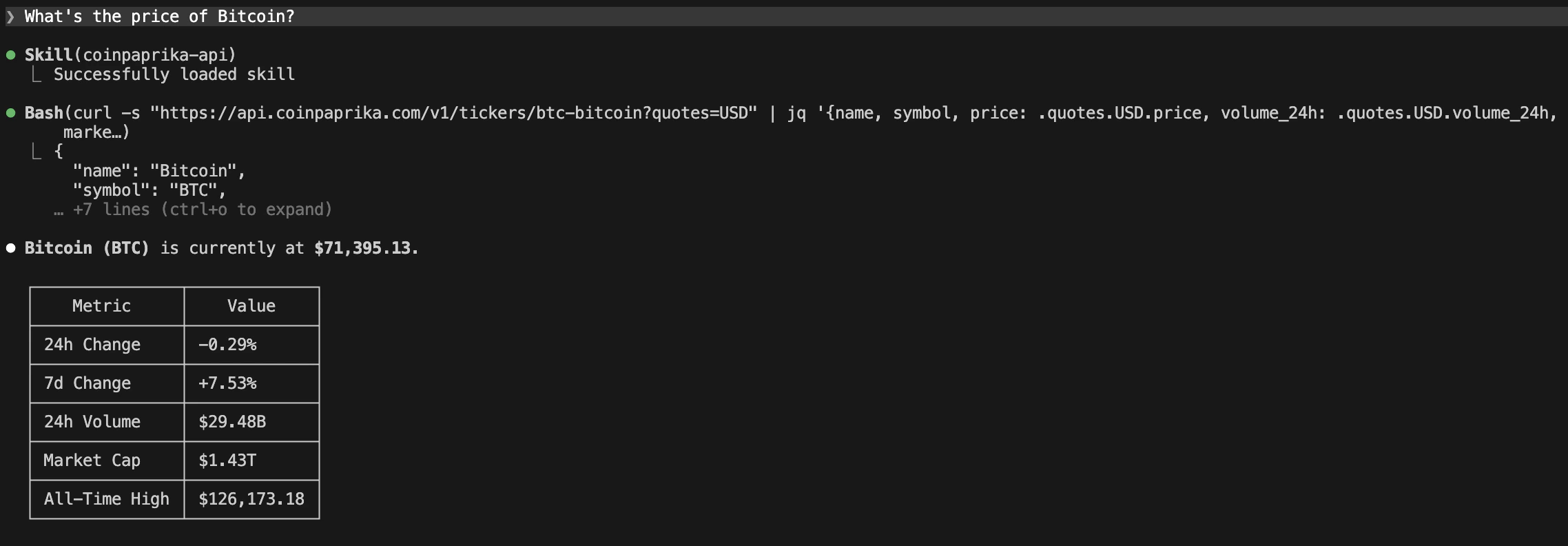
The agent should call `https://api.coinpaprika.com/v1/tickers/btc-bitcoin` and return the price. If it does, the skill is loaded and working.
Try a more specific query:
```
Get the top 10 coins by market cap using the CoinPaprika API
```
Restart Claude Code (or your AI tool) so it picks up the new skill files. Skills are discovered at startup.
***
## Verify it works
After restarting, ask your AI agent a CoinPaprika question:
```
What's the current price of Bitcoin?
```
The agent should call `https://api.coinpaprika.com/v1/tickers/btc-bitcoin` and return the price. If it does, the skill is loaded and working.
Try a more specific query:
```
Get the top 10 coins by market cap using the CoinPaprika API
```
 ***
## Example queries
Once the skill is loaded, your agent knows the full CoinPaprika API. Here are things you can ask:
### Price and market data
```
What's the price, market cap, and 24h volume for Ethereum?
```
```
Show me the top 20 coins by market cap with their 7-day price change
```
### Historical data
```
Get 30-day OHLCV history for Bitcoin
```
```
Show Bitcoin's price history for January 2025
```
### Search and discovery
```
Search for DeFi tokens on CoinPaprika
```
```
Which exchanges list Solana? Sort by volume.
```
### CLI commands
The skill teaches your agent to use `coinpaprika-cli` if it's installed:
```
Use coinpaprika-cli to get the Bitcoin ticker
```
```
Run coinpaprika-cli to search for stablecoin tokens
```
### Currency conversion
```
Convert 1 BTC to USD using CoinPaprika's price converter
```
***
## Skills vs MCP server vs Claude Code plugin
| | Agent Skills | Hosted MCP Server | Claude Code Plugin |
| --------------------------- | ----------------------------------------------------------------- | ------------------------------------- | --------------------------------------------- |
| **Install** | `npx skills add` | Add URL to config | `/plugin install` |
| **What it gives the agent** | Full API knowledge (endpoints, CLI, common workflows) | Live tool calls (29 MCP tools) | MCP tools + agent + skills |
| **Agent makes API calls** | Yes, directly via REST or CLI | No, MCP server handles calls | MCP server handles calls |
| **Works offline** | Yes (skill files are local) | No (needs mcp.coinpaprika.com) | No (needs MCP server) |
| **Works with** | Claude Code (default), Cursor, Cline, and more via `--agent` flag | Claude Desktop, Cursor, VS Code | Claude Code only |
| **Best for** | Any agent that can make HTTP calls or run CLI commands | Quick AI IDE setup with managed tools | Claude Code users who want everything bundled |
You can combine approaches. Install the skill for API knowledge **and** connect the [MCP server](/mcp-introduction) for tool-based access. They complement each other.
***
## Manage skills
```bash theme={"dark"}
# List installed skills
npx skills list
# Remove the skill
npx skills remove coinpaprika-api
# Update to latest version
npx skills update
```
***
## Troubleshooting
Restart your AI agent (Claude Code, Cursor, etc.). Skills are discovered at startup. If it still doesn't load, verify the files are in the right location:
```bash theme={"dark"}
ls .claude/skills/coinpaprika-api/
```
You should see `SKILL.md` and a `references/` directory.
The `skills` CLI requires Node.js 16+. Check your version:
```bash theme={"dark"}
node --version
```
If Node.js is installed and it still fails, try:
```bash theme={"dark"}
npx --yes skills add github.com/coinpaprika/skills/ --skill coinpaprika-api
```
Be specific in your prompt. Instead of "What's the price of Bitcoin?", try "Using the CoinPaprika API, get the ticker for btc-bitcoin." The agent should recognize the skill context and use the correct endpoints.
Skills must be direct children of `.claude/skills/`. If the files ended up nested differently (e.g., `.claude/skills/skills/coinpaprika-api/`), move the `coinpaprika-api` folder so it sits directly inside `.claude/skills/`.
***
## What's next?
Add managed MCP tools to Claude Desktop, Cursor, or VS Code
Get the full plugin bundle with MCP tools, agents, and skills
Query crypto data from the terminal with coinpaprika-cli
Complete endpoint documentation with interactive playground
***
## Need help?
Connect with our community for real-time support and discussions
Contact our team for technical assistance and custom integrations
### FAQs
Not for the free tier. The free CoinPaprika API provides 20,000 calls/month and covers 2,000 assets with no key required. For paid plans (Starter \$99/mo and up), you'll need an API key -- the skill includes instructions for both.
Skills give your agent knowledge (API docs, CLI commands, common patterns). MCP gives your agent tools (callable functions that return live data). Skills make your agent smarter about the API; MCP does the calling for it.
Claude Code, Cursor, Cline, OpenCode, Aider, and many others. The `skills` CLI auto-detects your agent, or you can target one explicitly with the `--agent` flag. See the [full list of supported agents](https://github.com/vercel-labs/skills).
Yes. Install the skill for deep API knowledge and connect the MCP server for tool-based access. They complement each other well.
***
## Example queries
Once the skill is loaded, your agent knows the full CoinPaprika API. Here are things you can ask:
### Price and market data
```
What's the price, market cap, and 24h volume for Ethereum?
```
```
Show me the top 20 coins by market cap with their 7-day price change
```
### Historical data
```
Get 30-day OHLCV history for Bitcoin
```
```
Show Bitcoin's price history for January 2025
```
### Search and discovery
```
Search for DeFi tokens on CoinPaprika
```
```
Which exchanges list Solana? Sort by volume.
```
### CLI commands
The skill teaches your agent to use `coinpaprika-cli` if it's installed:
```
Use coinpaprika-cli to get the Bitcoin ticker
```
```
Run coinpaprika-cli to search for stablecoin tokens
```
### Currency conversion
```
Convert 1 BTC to USD using CoinPaprika's price converter
```
***
## Skills vs MCP server vs Claude Code plugin
| | Agent Skills | Hosted MCP Server | Claude Code Plugin |
| --------------------------- | ----------------------------------------------------------------- | ------------------------------------- | --------------------------------------------- |
| **Install** | `npx skills add` | Add URL to config | `/plugin install` |
| **What it gives the agent** | Full API knowledge (endpoints, CLI, common workflows) | Live tool calls (29 MCP tools) | MCP tools + agent + skills |
| **Agent makes API calls** | Yes, directly via REST or CLI | No, MCP server handles calls | MCP server handles calls |
| **Works offline** | Yes (skill files are local) | No (needs mcp.coinpaprika.com) | No (needs MCP server) |
| **Works with** | Claude Code (default), Cursor, Cline, and more via `--agent` flag | Claude Desktop, Cursor, VS Code | Claude Code only |
| **Best for** | Any agent that can make HTTP calls or run CLI commands | Quick AI IDE setup with managed tools | Claude Code users who want everything bundled |
You can combine approaches. Install the skill for API knowledge **and** connect the [MCP server](/mcp-introduction) for tool-based access. They complement each other.
***
## Manage skills
```bash theme={"dark"}
# List installed skills
npx skills list
# Remove the skill
npx skills remove coinpaprika-api
# Update to latest version
npx skills update
```
***
## Troubleshooting
Restart your AI agent (Claude Code, Cursor, etc.). Skills are discovered at startup. If it still doesn't load, verify the files are in the right location:
```bash theme={"dark"}
ls .claude/skills/coinpaprika-api/
```
You should see `SKILL.md` and a `references/` directory.
The `skills` CLI requires Node.js 16+. Check your version:
```bash theme={"dark"}
node --version
```
If Node.js is installed and it still fails, try:
```bash theme={"dark"}
npx --yes skills add github.com/coinpaprika/skills/ --skill coinpaprika-api
```
Be specific in your prompt. Instead of "What's the price of Bitcoin?", try "Using the CoinPaprika API, get the ticker for btc-bitcoin." The agent should recognize the skill context and use the correct endpoints.
Skills must be direct children of `.claude/skills/`. If the files ended up nested differently (e.g., `.claude/skills/skills/coinpaprika-api/`), move the `coinpaprika-api` folder so it sits directly inside `.claude/skills/`.
***
## What's next?
Add managed MCP tools to Claude Desktop, Cursor, or VS Code
Get the full plugin bundle with MCP tools, agents, and skills
Query crypto data from the terminal with coinpaprika-cli
Complete endpoint documentation with interactive playground
***
## Need help?
Connect with our community for real-time support and discussions
Contact our team for technical assistance and custom integrations
### FAQs
Not for the free tier. The free CoinPaprika API provides 20,000 calls/month and covers 2,000 assets with no key required. For paid plans (Starter \$99/mo and up), you'll need an API key -- the skill includes instructions for both.
Skills give your agent knowledge (API docs, CLI commands, common patterns). MCP gives your agent tools (callable functions that return live data). Skills make your agent smarter about the API; MCP does the calling for it.
Claude Code, Cursor, Cline, OpenCode, Aider, and many others. The `skills` CLI auto-detects your agent, or you can target one explicitly with the `--agent` flag. See the [full list of supported agents](https://github.com/vercel-labs/skills).
Yes. Install the skill for deep API knowledge and connect the MCP server for tool-based access. They complement each other well.