

What is the CoinPaprika CLI?
A command-line tool for querying cryptocurrency market data. Covers the entire CoinPaprika API — tickers, coins, exchanges, OHLCV, search, contracts, tags, and currency conversion. Free tier included, no API key needed to start. Source: github.com/coinpaprika/coinpaprika-cliInstall
One-line install (macOS, Linux)
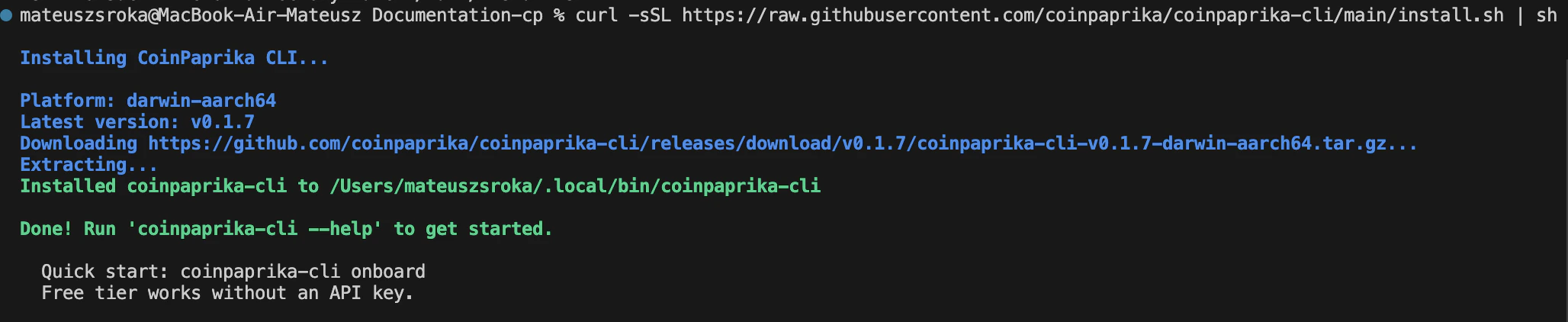
Verify installation
Quick start wizard
Commands
Every CoinPaprika REST API endpoint has a matching CLI command:Output formats
The CLI outputs tables by default. Switch to JSON for scripting and piping:jq for filtering:
Examples
Get the Bitcoin price
Top 10 coins by market cap
Search for a coin
Global market overview
Historical OHLCV (requires Starter plan or above)
Convert between currencies
Look up a token by contract address
Interactive REPL
coinpaprika-cli each time.
API key setup
The free tier works without a key (20,000 calls/month, 2,000 assets). For paid tiers:Coin ID format
CoinPaprika coin IDs follow the pattern{symbol}-{name} (lowercase, hyphens for spaces):
btc-bitcoin, eth-ethereum, usdt-tether, sol-solana, ada-cardano, doge-dogecoin, avax-avalanche, matic-polygon
Use coinpaprika-cli search {query} to find the correct ID for any coin.
Use with AI agents
AI agents running in terminals (Claude Code, Aider, etc.) can install and use the CLI as a tool. The one-liner install works in any shell:coinpaprika-cli directly with --output json --raw for machine-readable output. This is useful when:
- The agent doesn’t have MCP support
- You want the agent to script data pipelines
- You need to pipe output into other tools (
jq, scripts) - You’re running headless or in CI/CD
Troubleshooting
Command not found after install
Command not found after install
The installer puts the binary in Add that line to your
~/.local/bin. If that’s not in your PATH, add it:~/.bashrc, ~/.zshrc, or ~/.profile to make it permanent.Permission denied during install
Permission denied during install
The installer tries
~/.local/bin first (no sudo needed). You can also set a custom directory:No data returned for a coin
No data returned for a coin
Check the coin ID format. Use
coinpaprika-cli search <name> to find the correct ID. Coin IDs are lowercase: btc-bitcoin, not Bitcoin or BTC.OHLCV or historical data returns an error
OHLCV or historical data returns an error
Ticker history and contract history work without a key.
/v1/tickers/{coin_id}/historical returns a rolling year of daily ticks on the free tier, and /v1/contracts/{platform}/{address}/historical redirects to the same data. Ask for an earlier start and you get HTTP 402 naming the cutoff.OHLCV is the one that is gated. /v1/coins/{coin_id}/ohlcv/latest works without a key, but /v1/coins/{coin_id}/ohlcv/historical returns HTTP 402 for anything before the last full day, so a real OHLCV backfill needs a Starter plan ($99/mo) or above. Run coinpaprika-cli plans to see what’s available on the free tier.What’s next?
REST API Reference
Complete endpoint documentation with interactive playground
MCP Server
Connect Claude Desktop or Cursor to CoinPaprika data
Agent Skills
Install CoinPaprika skills for any AI agent
Python SDK
Official Python client for the CoinPaprika API
Need help?
Join Our Discord
Connect with our community for real-time support and discussions
Direct Support
Contact our team for technical assistance and custom integrations
FAQs
Do I need an API key?
Do I need an API key?
Not for the free tier. 20,000 calls/month, 2,000 assets, no key required. Paid plans (Starter $99/mo and up) unlock all assets and historical endpoints.
What are the rate limits?
What are the rate limits?
10 requests per second per IP, across all plans. Each CLI command makes one API call.
Can AI agents use the CLI?
Can AI agents use the CLI?
Yes. AI agents can install it with one command and use
--output json --raw for machine-readable output. The CLI covers every REST API endpoint.Does the CLI work on Windows?
Does the CLI work on Windows?
Pre-built binaries are available on the GitHub releases page. The install script works on macOS and Linux only.